
Boutiq Verify: How to Spot a Fake Btq V5
Boutiq Verify is your guide to confirming that your btq v5 is the real thing. Counterfeit copies of the Boutiq Switch exist, and some look convincing at first glance. This guide puts real and fake side by side, covering the packaging, the casing, the stickers and the scratch-to-scan code, so you can check your boutiq switch v5 with confidence. Counterfeiters keep improving, so use several checks together rather than relying on any single one.
Why Boutiq Verify Exists
Popular products get copied, and the btq v5 is no exception. A fake boutiq disposable can look close to the original, yet it won’t match the quality, the branding or the code system on a genuine one. We created Boutiq Verify so you can tell the difference before you use a product, not after. The checks below apply to the boutiq v5, also known as the v5 boutiq or boutiq switch v5, and a matching guide for the boutiq switch v6 is coming soon.
Boutiq Verify Step 1: Check the Packaging
Start with the box before you open anything. The packaging in our photos reads “Boutiq Switch V5,” “Liquid Live Diamonds” and “2.0G Triple Tank All-in-One.” Compare what’s in your hands with the photo below.
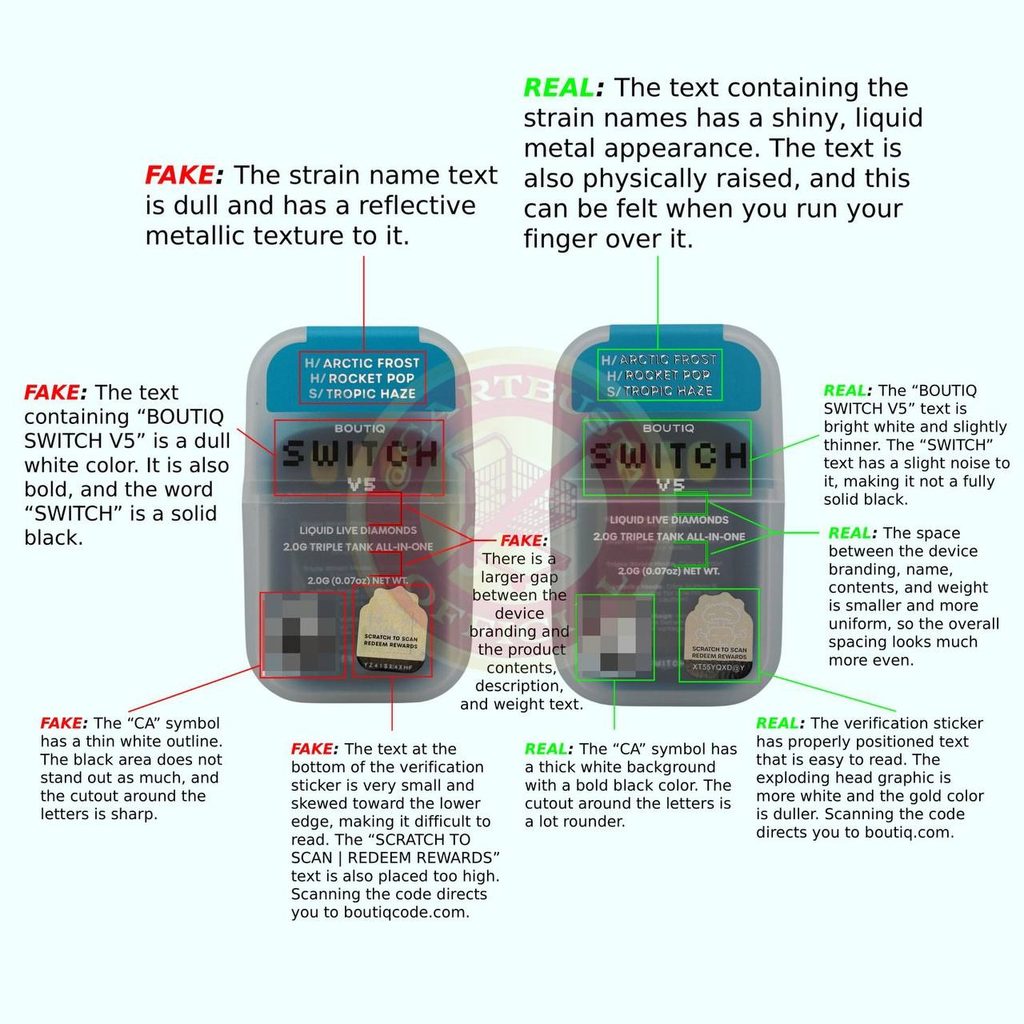
- Strain names. Real: the strain text has a shiny, liquid-metal look and is physically raised, so you can feel it when you run a finger over it. Fake: the text is dull with a reflective metallic texture.
- The “Boutiq Switch V5” logo. Real: the text is bright white and slightly thinner, and the word “SWITCH” has a slight noise in it, so it isn’t fully solid black. Fake: the text is a dull white and bold, and “SWITCH” is solid black.
- Spacing. Real: the gaps between the device branding, name, contents and weight are small and even. Fake: there is a noticeably larger gap between the device branding and the product contents, description and weight.
- The “CA” symbol. Real: it has a thick white background with a bold black symbol, and the cutout around the letters is rounder. Fake: it has a thin white outline, the black area doesn’t stand out, and the cutout around the letters is sharp.
Boutiq Verify Step 2: Check the Verification Sticker and Scan the Code
Every genuine pack carries a scratch-to-scan verification sticker with the “Scratch to scan | Redeem rewards” text. Look closely at the sticker in the packaging photo above.
- Real: the text is properly positioned and easy to read. The exploding head graphic looks more white, and the gold color is duller.
- Fake: the text at the bottom is very small and skewed toward the lower edge, which makes it hard to read. The “Scratch to scan | Redeem rewards” line also sits too high.
Then scan the code, and check where it takes you. On a genuine product, the code leads to boutiqinternationals.com. On the fake in our photos, it led to a different domain, boutiqcode.com. Fake products can carry working codes of their own, so a code that scans is not proof of authenticity. Always look at the web address.
Boutiq Verify Step 3: Check the Device Casing and Branding
Next, take the device out and examine the front. This is where fakes often give themselves away, because copying the materials and finish is expensive.
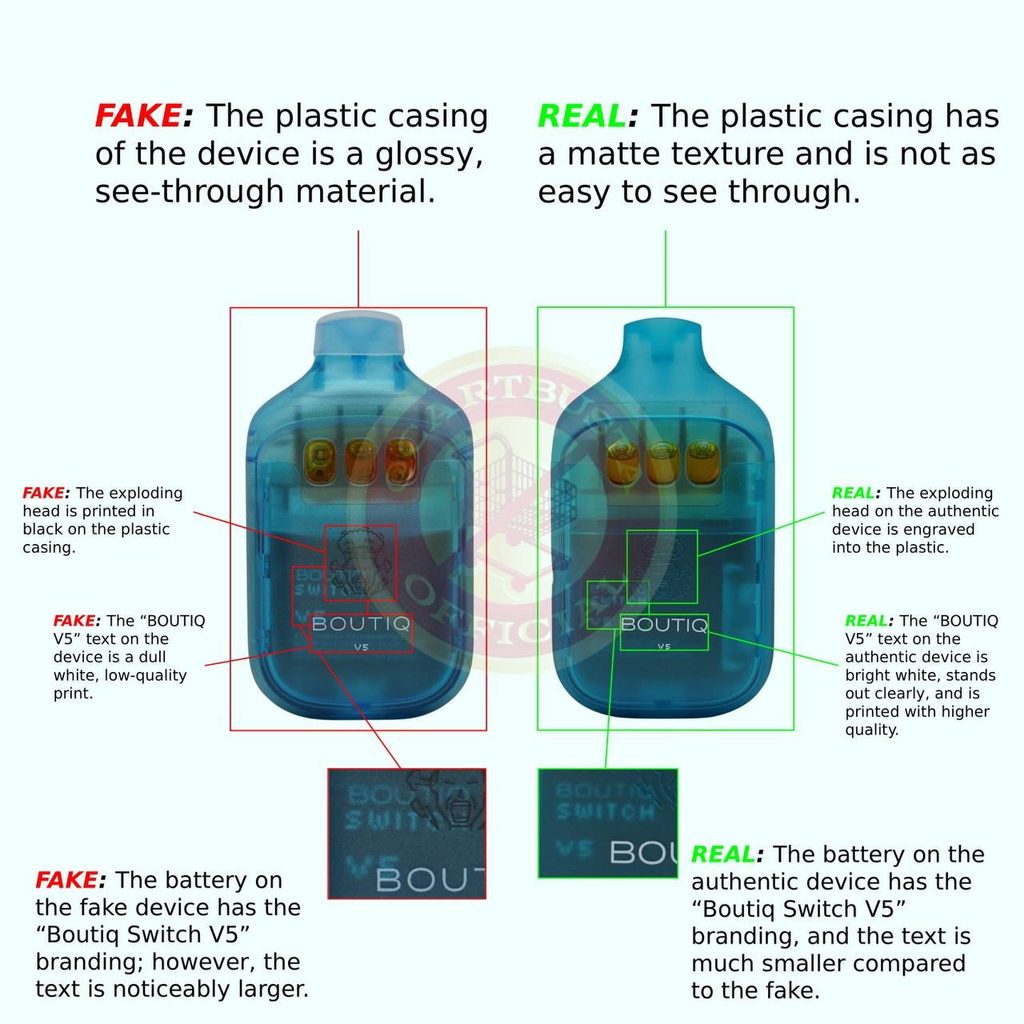
- Casing. Real: the plastic is matte and harder to see through. Fake: the plastic is glossy and see-through.
- The exploding head. Real: the logo is engraved into the plastic. Fake: it’s printed in black on the surface.
- “BOUTIQ V5” text. Real: the text is bright white, stands out clearly and is printed in higher quality. Fake: it’s a dull white with a low-quality print.
- Battery branding. Both versions carry “Boutiq Switch V5” on the battery. On the genuine device the text is much smaller. On the fake it’s noticeably larger.
Boutiq Verify Step 4: Check the Back of the Device
Finally, turn the device over. The back shows the operation sticker, the switch button and several of the easiest tell-tale signs.
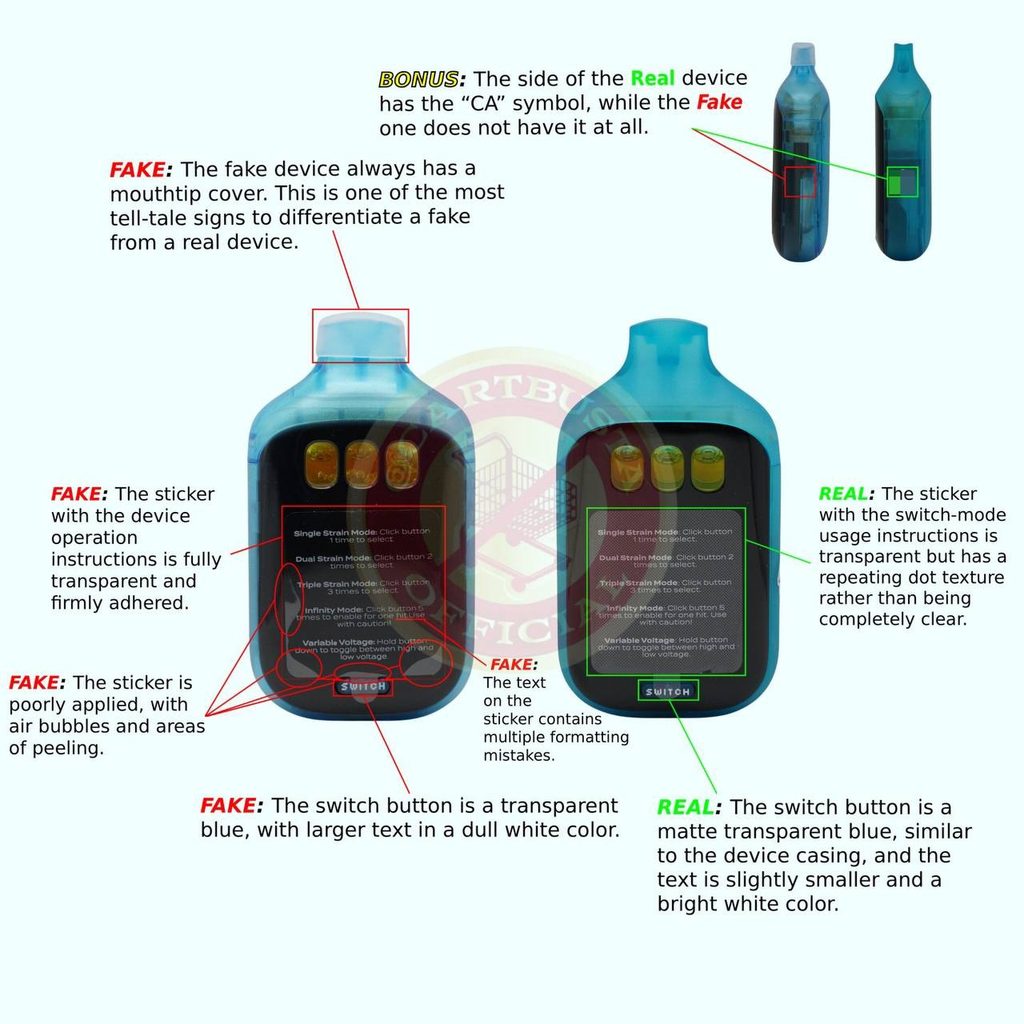
- Mouthtip cover. The fake in our comparison comes with a mouthtip cover, which is one of the clearest signs of a counterfeit. The genuine device doesn’t.
- Instruction sticker. Real: the sticker with the switch-mode instructions is transparent but has a repeating dot texture, so it isn’t completely clear. Fake: the sticker is fully transparent, poorly applied with air bubbles and peeling areas, and its text contains multiple formatting mistakes.
- Switch button. Real: the button is a matte transparent blue, similar to the casing, and the text is slightly smaller and bright white. Fake: the button is a transparent blue with larger, dull white text.
- “CA” symbol on the side. The side of the genuine device carries the “CA” symbol. The fake doesn’t have it at all.
Your Quick Boutiq Verify Checklist
Run through these before you use your btq v5:
- raised, liquid-metal strain text on the box
- bright white, slightly thinner “Boutiq Switch V5” logo
- even spacing between the printed lines
- bold, thick “CA” symbol with rounded cutouts
- readable verification sticker that scans to boutiq.com
- matte casing and an engraved exploding head
- bright white “BOUTIQ V5” print and small battery text
- no mouthtip cover
- textured instruction sticker, matte switch button and the “CA” symbol on the side
If several of these don’t match, treat the product with caution.
What to Do If Your Btq V5 Looks Fake
First, stop and don’t use a product you suspect is counterfeit. Next, keep the packaging and take clear photos of the box, the verification sticker, the device front and back. Then email us at info@boutiqinternationals.com with your photos and where you bought it, and we’ll review it. We can only stand behind products bought from us or from authorized sellers, so please check our Return and Refund Policy for how orders work. In the future, buy from sources you can verify.
Boutiq Verify Across the Whole Lineup
This guide covers the btq v5, our flagship triple-tank switch vape. We’ll add guides for the rest of the lineup, starting with the boutiq switch v4, and the same approach will apply to the boutiq v3 and future releases such as the boutiq v6. Whether you’re buying a boutique vape, a boutiq switch or boutiq carts, our advice stays the same: buy from sellers you can verify, and check before you use.
Boutiq Verify FAQ
What is Boutiq Verify?
It’s our guide and verification system for checking that a BOUTIQ product is genuine, using the packaging, the device and the scratch-to-scan code.
How do I check if my btq v5 is real?
Compare the packaging, the verification sticker, the casing and the back of the device with the photos on this page, then scan the code.
Where should the code take me?
On a genuine product, it leads to boutiqinternationals.com. If it takes you somewhere else, don’t trust the product.
Can a fake have a working QR code?
Yes. A code that scans doesn’t prove authenticity, so check the web address and the physical details as well.
What’s the easiest sign of a fake?
Several checks stand out: a mouthtip cover, glossy see-through casing, a printed rather than engraved exploding head, and a missing “CA” symbol on the side.
Will you add checks for other devices?
Yes. A guide for the boutiq switch v4 is coming soon.
Questions or a product you want us to look at? Email info@boutiqinternationals.com, or browse the Boutiq shop to see the genuine lineup.